Create your own language on top of the DLR

   Author : Lionel Laské (llaske@c2s.fr)

Introduction
About DLR
MyJScript
Language context
Create a syntax tree with the DLR
Build syntax tree from the grammar
Generate variables
Using variables
Data types
Rules to run your syntax tree
Object oriented programming with MyJScript
Set and get object properties
Build and call methods
Global context and built-in functions
CLR interoperability
Command line interpreter
Interoperability with other DLR languages
To learn more
Conclusion
Acknowledgments

Introduction

You need sometimes in an application to provide to the user its own programming language. For example to let users configure theirs own rules in the engine or allow them to change operations to compute a field. In these cases, as a developer, you need to build your own interpreter or compiler and plug it with your .NET code. So, you not only have to have good knowledge in writing a scanner and a parser, you also need to have a very good understanding of code generation to run statements of your new language.

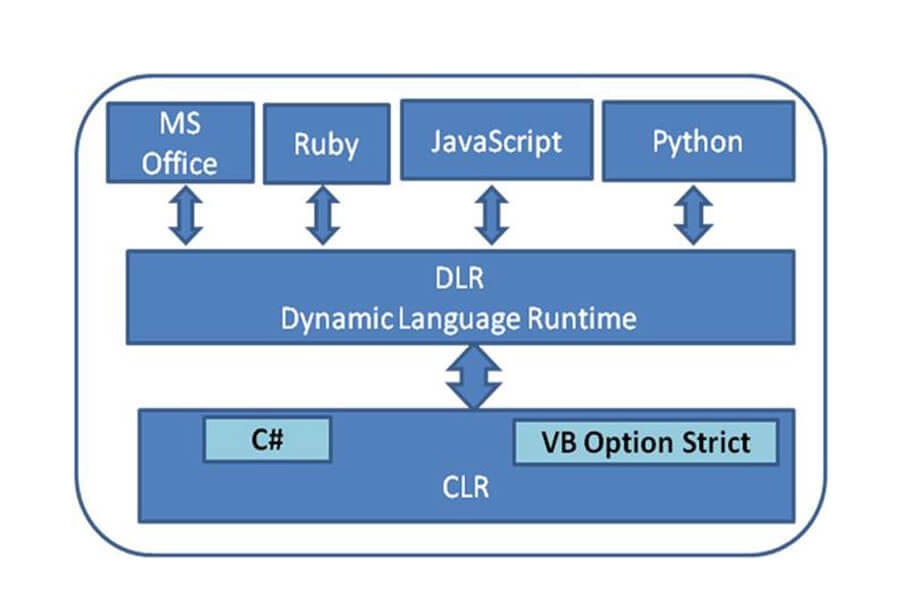
The Dynamic Language Runtime (DLR) is a layer on top of the .NET Framework 3.5 aiming at help you to build dynamic languages in .NET. Languages created with the DLR could be a language embedded in an application (like before) or a new language for the .NET platform like IronPython or IronRuby provided by Microsoft.

Here are the main objectives of the DLR:

  • Allow to build more easily a dynamic language,
  • Allow interoperability between a dynamic language and CLR,
  • Allow interoperability between all dynamic languages built on DLR.

In this article, we'll learn step by step how to write a new language on top of the DLR.

About DLR

The DLR is a DLL named "Microsoft.Scripting.dll". Today, DLR is provided with SilverLight and, as source code, with all dynamics languages from Microsoft (IronPython and Iron Ruby). DLR is distribute under the open source license Microsoft Public License.

The DLR defines a namespace "Microsoft.Scripting" and few sub-namespaces. The  Namespaces used is this article are :

  • Microsoft.Scripting.Ast for abstract syntax trees,
  • Microsoft.Scripting.Hosting to host DLR in your application,
  • Microsoft.Scripting.Shell to build your own command line interpreter.

The DLR was built (and continue to be built) with each release of Microsoft's dynamics languages. So the source code structure is not fully stable today. The DLR version used here is v1.0.0.1000 provided with IronPython 2.0 beta 1. I'll update the sample included in this article when the last version of the DLR will be available.

MyJScript

In this article, we are going to use a language derived from JavaScript, MyJScript. JavaScript is interesting because it is a language far from C# and VB.NET but not so complex to write as compiler. Here are the main features of MyJScript,

  • JavaScript based syntax: semi-colon, brackets, "var" and "function" keywords,
  • JavaScript based data types: int and string are supported in MyJScript. Both ways of write string constants are allowed: single-quoted and double-quoted. MyJScript strings support methods: length, substr, bold and blink,
  • Optional variable declaration: Variables are declared using the keyword "var". A non declared variable is considered to be a global variable,
  • Mix of statements and declaration: MyJScript compiler run statements in file order. So functions should be declared before their first use,
  • Object oriented: you can create object calling the constructor and using "new" keyword. you can set or get member values (methods and properties). The "this" keyword allows you to handle the current instance.  

These features are enough to allow us a study of main DLR features. Note that MyJScript is a just a sample. MyJScript is not related to the future "Managed JScript" from Microsoft.

Let's see two examples of MyJScript:  

    function fact(n) {
        if (n==0) return 1;
            return n*fact(n-1);
    }

    write("!4 = " + fact(4));

In this first sample, a factorial function is declared then I call it recursively. On the last line, you can see that int values are automatically converted to string when needed. Such conversion is not allowed in C#.

    function Cat(name) {
        this.name = name;
        this.miaow = function () { write(this.name+' said Miaow'); };
    }
    
    a = new Cat('Felix');
    a.miaow();
    Cat("this");
    this.miaow();

In this second sample, I handle MyJScript oriented object features. First I declared a constructor for a "Cat" class then I create an instance of this object. The "this" keyword is used also: at first to handle current instance in the "Cat" constructor, then to handle global context. Finally, note that both ways to write strings are used here (single-quoted or double-quoted).

Language context

The first thing to do to create your own language on the DLR is to write its "context". This context provide language property (name, id, version, ...) and defined entry points for DLR. Find below MyJScript's context. It's a class derivated from "Microsoft.Scripting.LanguageContext":

    class MJSLanguageContext : LanguageContext
    {
        // Constructor: initialize "binder"
        public MJSLanguageContext(ScriptDomainManager);
        
        // Language description
        public override Guid LanguageGuid;
        public override string DisplayName;
        public override Version LanguageVersion;
        
        // Parser entry point
        public override LambdaExpression ParseSourceCode(CompilerContext);
        
        // Look for a global symbol
        public override bool TryLookupGlobal(CodeContext, SymbolId, out object );
        
        // Command line customization
        public override ServiceType GetService<ServiceType>(params object[]);
        public override string FormatException(Exception exception);
    }

MJSLanguageContext constructor is the most important method here. It provide initialization for built-in functions ("write" for example) and create the language binding which set all rules for our language.

Another important method from language context is ParseSourceCode. Here is ParseSourceCode method for MyJScript.

        public override LambdaExpression ParseSourceCode(CompilerContext context)
        {
            // Call MyJScript parser
            Parser parser = new Parser(context.SourceUnit);
            parser.Parse();

            // Return the generated AST
            return parser.Result;
        }

ParseSourceCode is the true entry point for MyJScript interpreter. ParseSourceCode takes as parameter a context which contains source code to execute and should return the resulting syntax tree as a LambdaExpression. Then the syntax tree will be run by the DLR.

Create a syntax tree with the DLR

A syntax tree is a way to represent hierarchically a program from our language. Each node is an element: statement, operator or value. Take for example the statement:

    res = n * (n-1);

It could be represented by a tree like this:

The namespace "Microsoft.Script.Ast" contains one AST node for each element usable in a language built on CLS (Common Language Specification). So, our previous sample could be build as an AST with C# statements:

    Ast.Statement(span,
        Ast.Assign(
            res,
            Ast.Action.Operator(
                Operators.Multiply,
                typeof(object),
                Ast.Read(n),
                Ast.Action.Operator(
                    Operators.Subtract,
                    typeof(object),
                    Ast.Read(n),
                    Ast.Constant(1)
                )
            )
        )
    );

Of course, it's slightly "verbose". Some of you may have noticed some similarities with CodeDOM API. Both APIs provide a way to represent a program: AST in DLR is an API to generate IL code while CodeDOM API is an API to generate source code in C# or VB.NET.

Build syntax tree from the grammar

For those of you familiar with compiler's theory, you know that to build a syntax tree from a text, you must follow several steps:

  • Scanning: the scanner's job is to break up a text into known words. Known words for MyJScript are, for example: "var", "function", "if" or "+",
  • Parsing: the parser's job is to ensure that all known words are in a right order,
  • Build syntax tree: build a syntax tree in memory at the same time that parsing.

A deep discussion on scanning and parsing is out of scope of this article. However if you're interested by these tasks, a good introduction from Joel Pobar could be found in the February 2008 MSDN Magazine issue. For MyJScript, the parser is generated by Jay, a Yacc clone. Here is our parser's interface:

    class Parser
    {
        public Parser (SourceUnit source)
        {
            ...
        }
        
        public bool Parse()
        {
            ...
        }
        
        public LambdaExpression Result
        {
            get { return generator.Result; }
        }
    }

The parser object is initialized with a SourceUnit. SourceUnit is a DLR objet used to represent a source code coming from a command line or coming from a stream of characters in a source file. By the way, both sources could be processed differently. MyJScript parsing is run by a call of the Parse method. The Building of the AST is done at the same time that the parsing. For a maximum simplicity all AST building for MyJScript is done in a dedicated class named "Generator".

Let's take a sample: the MyJScript grammar rule for IF statement. Here how this rule is written in Jay/YACC:

    if_else: IF LPAR cond_expr RPAR block_or_statement ELSE block_or_statement 
            { $$ = generator.IfElse($3 as Expression, $5 as Expression, $7 as Expression); }
        | IF LPAR cond_expr RPAR block_or_statement 
            { $$ = generator.IfElse($3 as Expression, $5 as Expression, null); }

Here is the generated code for this rule in MyJScript Generator's:

        public Expression IfElse(Expression condition, Expression ifTrue, Expression ifFalse)
        {
            if (ifFalse == null)
                return Ast.IfThen(
                    Ast.Convert(condition, typeof(bool)),
                    ifTrue
                );

            return Ast.IfThenElse(
                Ast.Convert(condition, typeof(bool)),
                ifTrue,
                ifFalse
            );
        }

It's pretty easy because I just need to build corresponding nodes for IfThen and IfThenElse. Others MyJScript statements generate an AST in a very same way.

Generate variables

I should now put the focus specifically on variables handling in DLR. Variables scope are heavily dependant on the programming language that is used . From a programming language to another, a variable could be: global, local to a function, local to a block, be a class member, be an instance member, ... Whatever it could be, variable scope is always related to grammar. So, in C# for example, when you use a variable in a method, its scope could be deducted from the syntax. I must check first if the variable is local to the block, then if it's a parameter and finally if it's an instance variable (or a class variable for a static method).

The DLR allows you to declare variables into objets LambdaBuilder. An LambdaBuilder is an object to build a Lambda Expression either for the block of code of a function or either for an embedded block of code. The method LambdaBuilder.CreateLocalVariable creates a variable for the current block. The method LambdaBuilder.CreateParameter creates a parameter for the current block.

In MyJScript a variable could: be declared locally to a function, be a parameter or, by default (because variable declaration is not required), be a global variable. So, the following MyJScript code...

    a = 100;
    
    function foo(n) {
        var b = n + a;
        return b;
    }

... could be translated to following LambdaExpression:

MyJScript compiler stores itself variables scope using dictionary. One dictionary is used for global variables, one dictionary is used for local variables. MyJScript parameters are declared on the fly with each function declaration. The following code is called by the parser when the beginning of a function is detected.

        public void BeginFunction(String name, List<String> arguments)
        {
            if (name != null && globalVariables.ContainsKey(name))
            {
                report.Error(…); // function already exist
                return;
            }

            previousMethod = currentMethod;
            currentMethod = Ast.Lambda(name ?? "<member function>", typeof(object));

            localVariables = new Dictionary<string, Variable>();

            currentMethod.CreateParameter(SymbolTable.StringToId("this"), typeof(object));           
            if (arguments.Count > 0)
            {
                foreach (string parameter in arguments)
                    currentMethod.CreateParameter(SymbolTable.StringToId(parameter), typeof(object));
            }
        }

One can notice that

  • The globalVariables dictionary stores all global variables. When a new function declaration is found, I should ensure first that a variable with the same name don't already exist. With DLR, a function is just a callable variable !
  • The localVariables dictionary is initialized at the beginning of each function, not at the beginning of each block. In MyJScript, like in JavaScript, variables could only be local to a function. For more complex languages (like C#), variables could be local to a block. In this case, a dictionary should be used for each block of code.
  • Each parameter is created using a call to LambdaBuilder.CreateParameter. "this" is added as first parameter for each function. We'll talk about that later in this article.
  • Finally, note that variables names are not handled directly, the DLR use identifier instead. The SymbolTable.StringToId method is used to translate names to identifiers.

Using variables

In the previous paragraph, we saw how variables are stored. So, it's now easy to write code to retrieve variable's values. Here how it works in MyJScript:

        public Expression Variable(string name)
        {
            Variable variable = null;
            if (localVariables.ContainsKey(name))
                variable = localVariables[name]; // Local variable

            else 
            {
                if (currentMethod != null)
                {
                    foreach (Variable param in currentMethod.Parameters)
                        if (SymbolTable.IdToString(param.Name).Equals(name))
                            variable = param;

                    if (variable != null)
                        return Ast.Read(variable); // Parameter
                }

                if (variable == null)
                {
                    if (!globalVariables.ContainsKey(name))
                        return Ast.Read(SymbolTable.StringToId(name));  // Unknown variable
                    variable = globalVariables[name]; // Global variable
                }
            }

            return Ast.Read(variable);  // Known variable
        }

I first look in local variables dictionary, then in parameters and finally in global variables dictionary. In the case of a global variable:

  • If the variable is found, a node Ast.Read with an object variable is returned. This expression is called "BoundExpression" because the variable is bound to the read expression. So, DLR know directly the place to get variable's value.
  • If the variable is not found, a node Ast.Read with an idenfier (identifier is variable's name in symbol table) is returned. This expression is called "UnboundExpression" because the DLR must look at runtime where the variable's value is stored. Note that unbound expression could be meet for example when the variable was declared in another language (see below).

Data types

In his blog, Jim Hugunin said that handling of data types was one of the major choice in the DLR architecture. The problem is that, traditionally, each language use its own way to represent data types. So, a string of characters is a String objet for CLR, could be a PyString in Python and could be a MJSString in MyJScript.

Each specific class String, PyString or MJSString provides methods and properties which gives the power of each language. But how handling interoperability if no one language share the same way to handle data types ?

The DLR strategy is that only base types should be use. So a string of characters should be a String object whatever the language used. To allow that, the DLR use extension methods from .NET 3.5. For MyJScript, I want to add to the String type some methods like blink, bold and substr from JavaScript. Here is the source code to do that:

    [assembly: ExtensionType(typeof(string), typeof(MyJScript.Runtime.StringExtensions))]
    public static class StringExtensions
    {
        public static string blink(string @this)
        {
            StringBuilder res = new StringBuilder("<blink>");
            res.Append(@this);
            res.Append("</blink>");
            return res.ToString();
        }

        public static string bold(string @this)
        {
            StringBuilder res = new StringBuilder("<bold>");
            res.Append(@this);
            res.Append("</bold>");
            return res.ToString();
        }

        public static string substr(string @this, int index)
        {
            return @this.Substring(index);
        }

        public static string substr(string @this, int index, int length)
        {
            return @this.Substring(index, length);
        }
    }

With only this few lines of code, a String could be handle like a JavaScript String. Note that extension methods allow only to add methods, not properties. If you're interested to add properties, you should use rules instead (see below).

Rules to run your syntax tree

Here a sum up of what we learnt. To run our MyJScript statements, said "1 + 1", I just need to return a syntax tree from the language context's entry point ParseSourceCode. Here, I just have to return:

    Ast.Action.Operator(
        Operators.Add,
        typeof(object),
        Ast.Constant(1),
        Ast.Constant(1)
    )

What I need to do to run this ? Nothing ! When this syntax tree is received by the DLR, it is automatically translate to IL code and run. In my case the DLR just call sum of two integers.

It works because the DLR already known standard rules for most of data types. So I don't need to write something else.

Let's change now my sample to " 1 + 'A' ". This source code is a valid MyJScript statement because, like JavaScript, MyJScript provides implicit conversion between integers and strings. Here is the syntax tree:

    Ast.Action.Operator(
        Operators.Add,
        typeof(object),
        Ast.Constant(1),
        Ast.Constant("A")
    )

But here, it doesn't work ! The DLR doesn't know how to add a string to an integer. The DLR doesn't know this rule, we should learn it to him.

Rules are part of the Binder object built during language context initialization. Below is an extract from MJSBinder class:

    public class MJSBinder : ActionBinder
    {
        public MJSBinder(CodeContext context) : base(context)
        {
        }

        protected override StandardRule<T> MakeRule<T>(CodeContext callerContext, DynamicAction action, object[] args)
        {
            if (operation.Operation == Operators.Add
              && args[0] is int
              && args[1] is string)
            {
                // Rule to add string and int in MyJScript
                return MakeAddStringRule<T>(callerContext, action, args);
            }

            // Leave DLR find a rule
            return base.MakeRule<T>(callerContext, action, args);
         }

    ...
    }

The heart of MJSBinder is the MakeRule method. MakeRule is called each time the DLR find an expression that it doesn't know how to run. The MakeRule method must return a rule: a condition to run the rule and the code to be run. Both parts of a rule are AST as those seen previously. Here is the source code for my MakeAddStringRule method:

        private StandardRule<T> MakeAddStringRule<T>(CodeContext callerContext, DynamicAction action, object[] args)
        {
            StandardRule<T> rule = new StandardRule<T>();

            // Same as: (p0 is int) && (p1 is string)
            rule.Test =
                Ast.AndAlso(
                    Ast.TypeIs(rule.Parameters[0], typeof(int)),
                    Ast.TypeIs(rule.Parameters[1], typeof(string))
                );

            // Same as: string.Contat(p0.ToString(), p1)
            rule.Target =
                rule.MakeReturn(this,
                    Ast.Call(
                        typeof(string).GetMethod("Concat", new Type[] { typeof(string), typeof(string) }),
                        Ast.Call(
                            Ast.Convert(rule.Parameters[0], typeof(object)),
                            typeof(object).GetMethod("ToString", new Type[0])
                        ),
                        Ast.Convert(rule.Parameters[1], typeof(string))
                    );

          return rule;
      }

This rule consists in a test and a target. The test (set on StandardRule.Test property) checks if the first parameter is an integer and if the second one is a string. The target (set on StandardRule.Target property) is the tree to run to obtain the result. Here, the target is the first parameter converted to a string concatenated with the second parameter.

Once a rule is created, the DLR has every thing in order run our expression "1 + 'A'". More: if the DLR find another time one integer plus one string, the rule will be applied without a new call to our MJSBinder.MakeRule method.

Each rule from MyJScript should be described in the same way. So it could be slightly verbose. It could be complex too if the target needs several complex operations. In this case, you could call a function instead. Let's see the following MyJScript expression:

    '10' < 2

Comparing the two members of this expression using a string conversion will produce a wrong result. The reason is that the number 1 is before the number 2 in the lexicographic order. To get the right result, the left member should be converted before doing any comparison. That's what has been done by the JavaScript interpreter. This process requires to try conversion first then to do a comparison as string or as integer depending on the result of the conversion. It's difficult to do that in an AST, so we should use a method instead. The method "MJSLibrary.Compare" does this work for us. So, here is the rule to compare an integer and a string:

       private StandardRule<T> MakeCompareStringRule<T>(CodeContext callerContext, DynamicAction action, object[] args)
        {
            StandardRule<T> rule = new StandardRule<T>();

            // Same as: (p0 is string) && (p1 is int)
            rule.Test =
                Ast.AndAlso(
                   Ast.TypeIs(rule.Parameters[0], typeof(string)),
                   Ast.TypeIs(rule.Parameters[1], typeof(int))
                );

            // Same as: MJSLibrary.CompareTo(p0, p1) < 0
            rule.Target =
                rule.MakeReturn(this,
                    Ast.LessThan(
                        Ast.Call(
                           typeof(MJSLibrary).GetMethod("CompareTo"),
                           rule.Parameters[0],
                           rule.Parameters[1]
                        ),
                    Ast.Constant(0)
                    );

          return rule;
      }

Object oriented programming with MyJScript

The DLR could be used not only to handle values for base types but also to handle instances in an object oriented language. We are going to see how in few minutes. But let's see first how objects are handled in JavaScript.

In JavaScript, objects are just collections of name/value pairs. A good way to check this out is to explore the JavaScript Object Notation (JSON). So, for example, our "Cat" object is usually declared like this:

    function Cat(name) {
        this.name = name;
        this.miaow = function () { alert(this.name+' said Miaow'); };
    }

    x = new Cat('Felix');

but it could be declared like this using JSON:

    x = { "name":"Felix", "miaow": function() { alert(this.name+' said Miaow'); } }

Both declarations do exactly the same thing. In JavaScript, there is no need to declare in first each class with its properties and methods. JavaScript objects are built progressively each time that its members are set. The JavaScript syntax "new Constructor(...)" is just a syntaxic sugar to create an empty object then call an initializer function. So, the third way to initialize a JavaScript object could be:

    x = {};
    Cat.call(x, 'Felix');

Note that in JavaScript, a function is just an object providing a specific method "call" which takes as parameter the value for this and the constructor's parameters. Because a function is just a value, adding a new method to an instance is as easy as setting a new member to the instance (like for "miaow" in our sample).

MyJScript objects work in a very similar way than JavaScript. The following snippet provides some details regarding the MJSObject source code. The MJSObject class is used for each MyJScript instance:

    public class MJSObject
    {
        Dictionary<string, object> members;

        public MJSObject()
        {
            this.members = new Dictionary<string, object>();
        }

        public bool HasMember(string name)
        {
            return members.ContainsKey(name);
        }

        public virtual void Set(string name, object value)
        {
            if (members.ContainsKey(name))
                members.Remove(name);

            members.Add(name, value);
        }

        public virtual object Get(string name)
        {
            if (!members.ContainsKey(name))
                return null;

            return members[name];
        }
    }

The MJSObject class is a dictionary of name/values. Each name stores instance variables: properties or methods (like "name" or "miaow" in our previous sample).

Set and Get object properties

The MyJScript compiler allows you to create an empty object using this statement:

    x = {};

The MyJScript parser translates this statement into this tree:

    Ast.Statement(span,
        Ast.Assign(
            x,
            Ast.New(
                typeof(MJSObject).GetConstructor(new Type[0])
            )
        )
   );

It means: the result of the call of to MJSObject's constructor without parameter is assigned to the variable "x".

Then, to set or to get members for the new object, I should first teach to DLR these operations. So, I add two new rules to my MJSBinder class:

        private StandardRule<T> MakeSetMemberRule<T>(CodeContext callerContext, DynamicAction action, object[] args)
        {
            SetMemberAction setmember = (SetMemberAction)action;
            StandardRule<T> rule = new StandardRule<T>();

            // Same as: (p0 is MJSObject)
            rule.Test = Ast.TypeIs(rule.Parameters[0], typeof(MJSObject));

            // Same as: (p0 as MJSObject).Set(name, p1)
            rule.Target =
                rule.MakeReturn(this,
                    Ast.Call(
                        Ast.Convert(rule.Parameters[0], typeof(MJSObject)),
                        typeof(MJSObject).GetMethod("Set", new Type[] { typeof(string), typeof(object) }),
                        Ast.Constant(SymbolTable.IdToString(setmember.Name)),
                        Ast.Convert(rule.Parameters[1], typeof(object))
                    )
                );

            return rule;
        }


        private StandardRule<T> MakeGetMemberObjectRule<T>(CodeContext callerContext, DynamicAction action, object[] args)
        {
            GetMemberAction getmember = (GetMemberAction)action;
            StandardRule<T> rule = new StandardRule<T>();

            // Same as: (p0 is MJSObject)
            rule.Test = Ast.TypeIs(rule.Parameters[0], typeof(MJSObject));

            // Same as: (p0 as MJSObject).Get(name)
            rule.Target =
                rule.MakeReturn(this,
                    Ast.Call(
                        Ast.Convert(rule.Parameters[0], typeof(MJSObject)),
                        typeof(MJSObject).GetMethod("Get", new Type[] { typeof(string) }),
                        Ast.Constant(SymbolTable.IdToString(getmember.Name))
                    )
                );

            return rule;
        }

The first rule is called when MJSBinder.MakeRule meet a "SetMember" operation. The condition to run this rule is that the type of object is "MJSObject". The code to run is a call to MJSObject.Set with the property name and the value to set as parameters. The second rule is called when MJSBinder.MakeRule meet a "GetMember" operation. The condition and the code to run are similar to the first rule but use a call to "MJSObject.Get" instead.

Thanks to these rules, the MyJScript compiler is now able to run statements:

    x.name = "Hello";
    write(x.name);

Build and call methods

Let's see now how I can use methods. Here are MyJScript statements to declare and call an instance method:

    x.foo = function(n) { write(n); }
    x.foo("Hello");

We saw before that the parser translates a function into a LambdaExpression. It's easy to call a LambdaExpression because, behind the scene, the DLR translates LambdaExpression into a .NET delegate. So, to call a LambdaExpression, I just need to generate a call. Here how methods call are handled in MyJScript:

        public Expression MethodCall(Expression instance, String function, List<Expression> values)
        {
            int length = values.Count;
            Expression[] array = new Expression[length+1];

            array[0] = instance;
            for (int i = 0; i < length; i++)
                array[i+1] = values[i];

            return Ast.Action.InvokeMember(
                SymbolTable.StringToId(function),
                typeof(object),
                InvokeMemberActionFlags.None,
                new CallSignature(values.Count),
                array
                );
        }

MyJScript builds a new array for parameters adding the instance as first parameter, then MyJScript launches the call of the member using InvokeMember action.

Because MyJScript should retrieve the instance in the "this" parameter, I need to add a new rule to the MJSBinder. This rule will be call for "InvokeMember" operation on MJSObject type:

        private StandardRule<T> MakeInvokeMemberRule<T>(CodeContext callerContext, DynamicAction action, object[] args)
        {
            StandardRule<T> rule = new StandardRule<T>();
            InvokeMemberAction invokeMember = (InvokeMemberAction)action;

            // Same as: (p0 is MJSObject)
            rule.Test = Ast.TypeIs(rule.Parameters[0], typeof(MJSObject));

            Expression method = Ast.Action.GetMember(
                invokeMember.Name,
                typeof(object),
                rule.Parameters[0]
             );

            Expression[] newparam = new Expression[rule.Parameters.Length + 1];
            newparam[0] = method;
            for (int i = 0; i < rule.Parameters.Length; i++)
                newparam[i + 1] = rule.Parameters[i];

            // Same as: p0.name(p0, p1, … pn)
            rule.Target =
                rule.MakeReturn(this,
                    Ast.Action.Call(
                        typeof(object),
                        newparam
                    )
                );

            return rule;
        }

This rule achieves its role in three steps: first, get member's value, then add the current instance as parameter (it's the "this" parameter) and finally call method using these new parameters.

Global context and built-in functions

The global context is the last point to see to achieve MyJScript overview. In JavaScript, everything defined globally is a member of the global object. So, a global variable or a global function is bound to this global object. Let's see an example:

    x = 'Hello';
    alert(this.x);     // Print Hello

More cool: I can transform our global object into a "Cat" (should be avoid in real life !). To do that, I just call the Cat's constructor:

    this.Cat('Felix');
    alert(name);      // Print Felix
    miaow();          // Print Felix said Miaow

In MyJScript, this global context is an MJSObject Singleton. Here is the source code to host this singleton:

        public class MJSContext
        {
            static MJSObject @this = null;
    
            public static MJSObject GetContext()
            {
                if (@this == null)
                    @this = new MJSObject();
                return @this;
            }
        }

Every operation done on global variables and global functions should also be done into the global context. So, assigning a global variable should generate two statements tree:

        public Expression AssignGlobalVariable(Variable variable, Expression value)
        {
            List<Expression> statements = new List<Expression>();

            // variable = value
            statements.Add(
                    Ast.Assign(
                        variable,
                        Ast.Convert(value,  typeof(object))
                    )
             );

            // MJSContext.GetContext().Set(variable, value)
            statements.Add(
                    Ast.Action.SetMember(
                        SymbolTable.StringToId(variable.Name),
                        typeof(object),
                        Ast.Call( typeof(MJSContext).GetMethod("GetContext", new Type[0]))
                    ),
                    Ast.Read(variable)
            );

            return Ast.Block(statements);
        }

The first statement assigns variable's value, the second one calls MJSContext.GetContext().Set() to assign the matching member in the global context.

The global context is also used to host MyJScript "built-in" functions like "write":

    public class MJSLibrary
    {
        internal static void Initialize()
        {
            MJSObject mjscontext = MJSContext.GetContext();
            mjscontext.Set(
                "write",
                ReflectionUtils.CreateDelegate(
                    typeof(MJSLibrary).GetMethod("Write"),
                    typeof(MyJScriptCallTarget)
                )
            );
           ...
        }

        public static object Write(object @this, object value)
        {
            Console.WriteLine(value != null ? value.ToString() : "<null>");
            return null;
        }
    }

Let's look back now on MJSContext.TryLookupGlobal method that we saw in first paragraph of this article. This method is called by DLR to solve unknown variable name. Below is the source code of this method in MyJScript:

        public override bool TryLookupGlobal(CodeContext context, SymbolId name, out object value)
        {
            MJSObject mjscontext = MJSContext.GetContext();
            string memberName = SymbolTable.IdToString(name);
            if (mjscontext.HasMember(memberName))
            {
                value = mjscontext.Get(memberName);
                return true;
            }

            return base.TryLookupGlobal(context, name, out value);
        }

CLR interoperability

As we saw before, base types like "string" or "int" are shared types for all DLR languages. Thanks to this, I could use transparently in MyJScript properties and methods coming from this types. Here are some examples:

        a='Hello';
        write(a.Length);
        write(a.ToUpper() + ' WORLD!');

Note that calling "Length" property and "ToUpper" method doesn't launch MyJScript's rules. That's because MyJScript's rules are only set for MJSObjects. However, the result of plus operation between "ToUpper" and a string constant really come from a MyJScript rule.

The DLR provides also a way to import objects from other CLR assemblies. Because this feature doesn't exist in JavaScript, I add in MyJScript a "using" keyword like in C#. See below an example using this new keyword.

        using System;

        var date = System.DateTime;
        var now=date.Now;
        write(now.Year);
        write(now.ToString());

A deep discussion about how to implement "using" is not really interesting. You could only remember that I just need to call a DLR method named "LanguageContext.DomainManager.Globals.TryGetName(name)". This method loads a variable in the current context with all member for each class and object in the context.

Command line interpreter

The MyJScript compiler is now finished. So, it could be nice to write a command line interpreter to run MyJScript commands or scripts. The DLR provides standard functions to write very easily a console. Here is all the code needed. It should derive from the  Microsoft.Script.Hosting.ConsoleHost:

    public class MJSConsole : ConsoleHost
    {
        protected override void Initialize()
        {
            base.Initialize();
            this.Options.ScriptEngine = ScriptEnvironment.GetEnvironment().GetEngine(typeof(MJSLanguageContext));
            Environment.LoadAssembly(typeof(string).Assembly)
        }

        [STAThread]
        static int Main(string[] args)
        {
            return new MJSConsole().Run(args);
        }
    }

We could slightly customize this command line with a logo and a specific prompt. To do that, we should add a MJSCommandLine class linked to the MJSLanguageContext class.

    class MJSCommandLine : CommandLine
    {
        protected override string Logo
        {
            get
            {
                return "MyJScript Command line\r\nLGPL Copyright (c) Lionel Laské 2008\r\nType CTRL-Z and RETURN to quit\r\n\r\n";
            }
        }

        protected override string Prompt
        {
            get
            {
                return "mjs> ";
            }
        }
    }

That's all ! With only these few lines, the MyJScript interpreter can:

  • Run statements from the command line,
  • Run statements from a file,
  • Provide lot of DLR options (see below).

Interoperability with other DLR languages

We saw how MyJScript can interoperate with CLR types. Let's see now how MyJScript can interoperate with other DLR languages and, more precisely, interoperate with the most famous one: IronPython.

The previous paragraph shows how you could create a console to host the DLR. You've also have the opportunity to host yourself the DLR and its languages. It could be done first with a call to create a new ScriptRuntime object. Here how:

    // Create a new DLR runtime
    ScriptRuntime runtime = ScriptRuntime.Create();

    // Create a global scope
    ScriptScope globals = runtime.CreateScope();

Then, we need to load the language runtime from its context. It's a Microsoft.Script.Hosting.ScriptEngine object:

    // Load MyJScript engine
    ScriptEngine myjscript = runtime.GetEngine(typeof(MyJScript.DLR.MJSLanguageContext));

    // Run a command on MyJScript engine
    ScriptSource mjssrc = myjscript.CreateScriptSourceFromString("write('Hello world!');");
    mjssrc.Execute(globals);

I'm doing the same thing for IronPython engine:

    // Load IronPython engine
    ScriptEngine python = runtime.GetEngine(typeof(IronPython.Runtime.PythonContext));

    // Run a command on IronPython engine
    SriptSource pysrc = python.CreateScriptSourceFromString("print 'Hello world!';", SourceCodeKind.Statements);
    pysrc.Execute(globals);

Let's now write an utility function RunProgram to easier call in next samples.

    static private void RunProgram(ScriptEngine engine, string command)
    {
        ScriptSource src = engine.CreateScriptSourceFromString(command, SourceCodeKind.Statements);
        src.Execute(globals);
    }

I could now have a combined call to both compilers: IronPython and MyJScript.

    // Call a MyJScript variable from IronPython
    RunProgram(myjscript, "a='MyJScript';");
    RunProgram(python, "print 'Hello',a;");
    
    // Call a IronPython variable from MyJScript
    RunProgram(python, "b='IronPython';");
    RunProgram(myjscript, "write('Hello '+b);");

In these samples, a variable is initialized in one language then the same variable is used in the other language. Each time, specific rules to the current language are applied.

It could be nice also to create a MyJScript object then to use this object in IronPython or conversely. However, it's not as easy. In fact, each language use its own rules. IronPython doesn't know how to handle MJSObject and MyJScript doesn't know how to handle PyObject. So mixing objects in a multi-language environment is a more complex process.

To learn more

About DLR

There are very few documentation on the DLR today. The Jim Hugunin's blog is the DLR bible but unfortunately, there are few posts inside and no recent post. However this blog is very interesting to read to learn more about concepts inside DLR.

The John Lam' blog is also an interesting way to get information about DLR. John works on IronRuby team. His blog is updated very often but doesn't talk exclusively about DLR.

Martin Maly, one of the DLR author has started recently a blog dedicated to the DLR. This blog is really the best path today to understand the DLR way of working. Lot of features of the DLR are described in each post and from the beginning, there are already more than ten posts that have been published here.

A good way to study DLR could be also to study the DLR source code. It's possible because the DLR is an open source project. Unfortunately, the source code includes very few comments and the documentation inside is just a compilation of all comment... It's very interesting to have a look on how DLR languages are implemented. Toyscript is a tiny basic downloadable with the DLR. It was created to be used as a tutorial so it's a good introduction to the DLR. Of course you could also study IronPython or IronRuby source code but, due to the number of lines, there are more complexes to understand.

Few webcasts are interesting to go deep inside the DLR. If you've got an access to TechEd 2007's video, see for example the excellent session WEB404 from Martin Maly. More recently, the Lang.Net symposium has also lot of "to-be-seen" videos for guys interested by compilers.

About MyJScript

The source code for MyJScript is downloadable on CodePlex (http://www.codeplex.com/MyJScript). The code includes lot of comments and unit testing from all major features. MyJScript has been write as a tutorial to learn compiler technology and the DLR. So, MyJScript is not a true JavaScript compiler.

Two major JavaScript features has been simplified in MyJScript:

  • A function can't be used before its declaration. Because MyJScript generate AST "on the fly", it can't see a function declared below. To avoid this, most of languages build on DLR use an intermediate tree instead of an AST.
  • MyJScript objects can't derive from others objects using "prototype" function (see the great article from Ray Djajadinata on MSDN to learn more on this). Heritage could be added in MyJScript with some changes in MJSObject implementation.

Conclusion

This article talks about most important features of the DLR:

  • AST: allows you to build easily a set of statements and generate it to IL code.
  • Rules: provide a non intrusive way to teach to the DLR all specific features (conversion, member function, extended types, ...) of your language.
  • Hosting: allows you to generate very easily a console for your language or include a DLR language in your application.

Thanks to these three features, the DLR provides basic tools to write your own language with native CLR interoperability and with other DLR languages. It's no doubt that it's really the power of the DLR.

Acknowledgments

Many thanks to Sami Jaber for his thorough reading of this article. Thanks also to Bill Chiles to suggest me to translate this article from french.

Lionel Laské is software architect in C2S - a software company based in France and subsidiary of Bouygues group. Lionel is also the author of Liogo, an Open Source Logo compiler for .NET. Lionel can be contacted at llaske@c2s.fr.